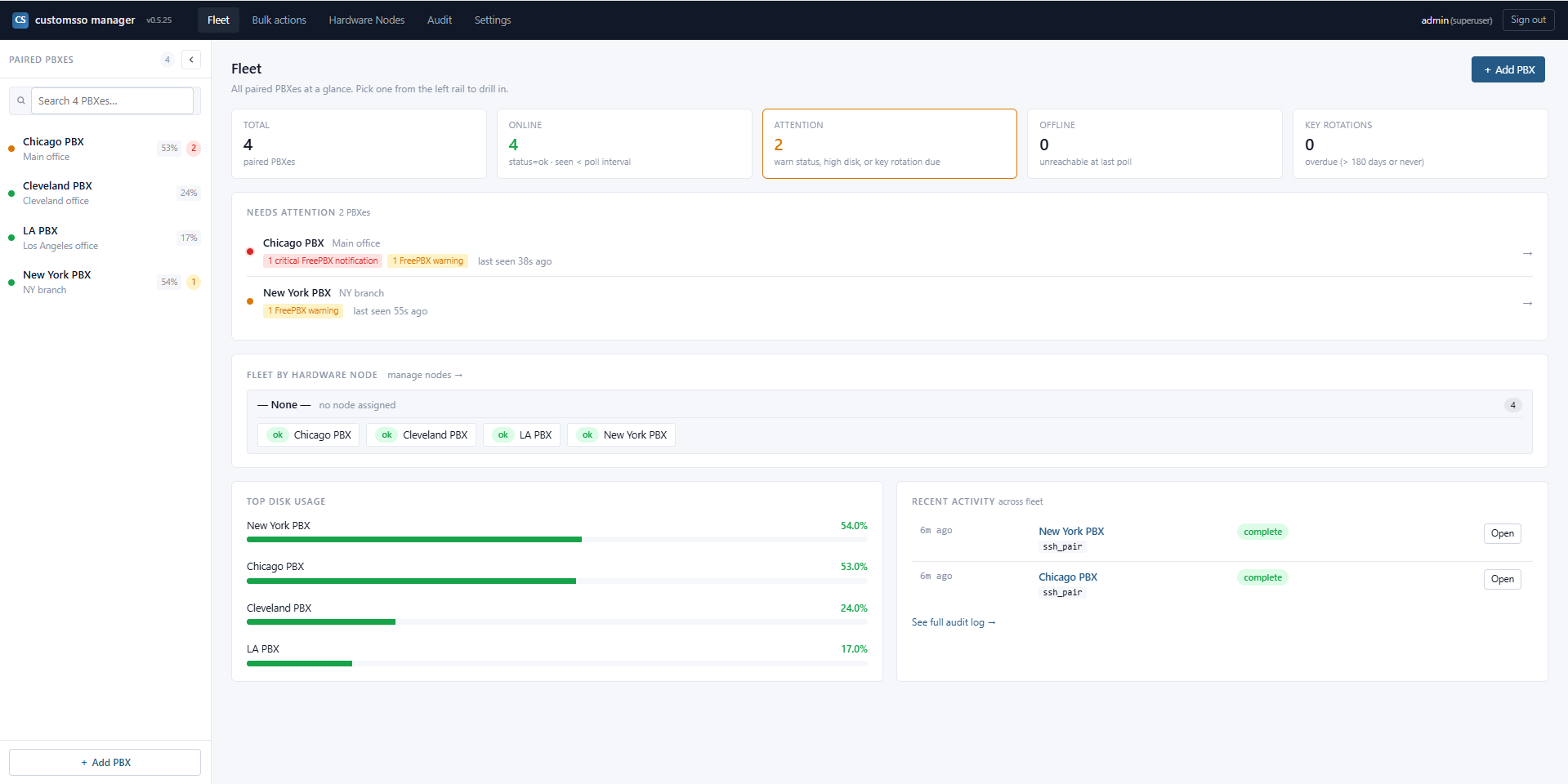
The fleet view — every paired PBX at a glance, with per-box disk usage, FreePBX notification counts (aggregated fleet-wide), and last-seen timestamps
Passwordless single sign-on into every paired FreePBX admin UI and into any FreePBX user's UCP session — embedded in an iframe, one click from the fleet view, no login page, no password re-entry. Plus encrypted fleet backup with one-command disaster recovery, one-step PBX pairing, fleet-wide FreePBX notification rollup, scheduled fleet-wide cron, and edge-triggered health alerts. Open source, self-hosted, MIT licensed. One binary to install, one one-liner to pair each PBX. No agents to distribute, no seats to license.
Thirteen capabilities that add up to running an entire FreePBX fleet from one console.
One click in the fleet view drops you straight into the full FreePBX admin interface, already authenticated as admin, with no password prompt and no login page in between. Every FreePBX menu, module, and page renders inside an iframe tab within the manager so you keep the fleet sidebar on the left while operating any single box on the right. Full-window redirect mode also available if you'd rather work on the PBX's own origin.
A searchable per-PBX picker of every UCP-enabled user. Click Open UCP → on any row and the manager mints a one-shot signed SSO token that lands you in that user's UCP session — voicemail, contacts, call history, call recordings, presence — all in an iframe tab inside the manager, with no password required. Reproduce "my voicemail won't play" or "my BLF is stuck" as the affected user in seconds instead of phoning them for their password. Admin role gated; every impersonation audit-logged.
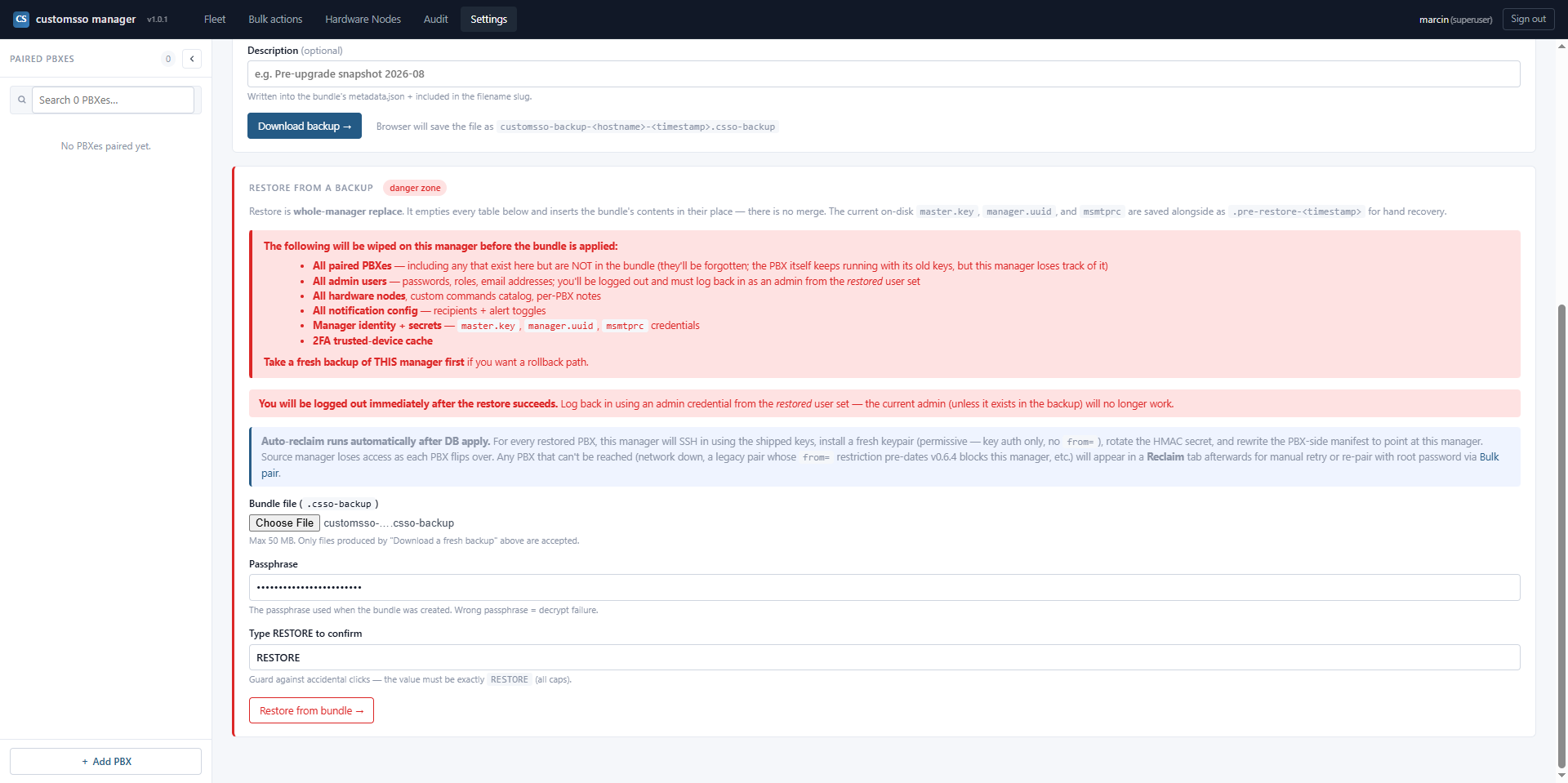
A single admin action produces an AES-256-GCM-encrypted backup bundle containing the manager database, the master key, every PBX's SSH key material, and the HMAC secrets. On a fresh manager host, restore the bundle and run the Reclaim wizard — the manager SSHes into every previously-paired PBX (using the keys inside the restored bundle) and takes ownership passwordlessly, locking out the previous manager. Full fleet recovery from bare metal in minutes, not days.
Type a PBX's IP + root password once. The manager SSHes in, installs a minimal agent module, drops SSH keys, records a manifest of every file it touched, then wipes the password. Symmetric unpair — one click removes exactly what pairing wrote.
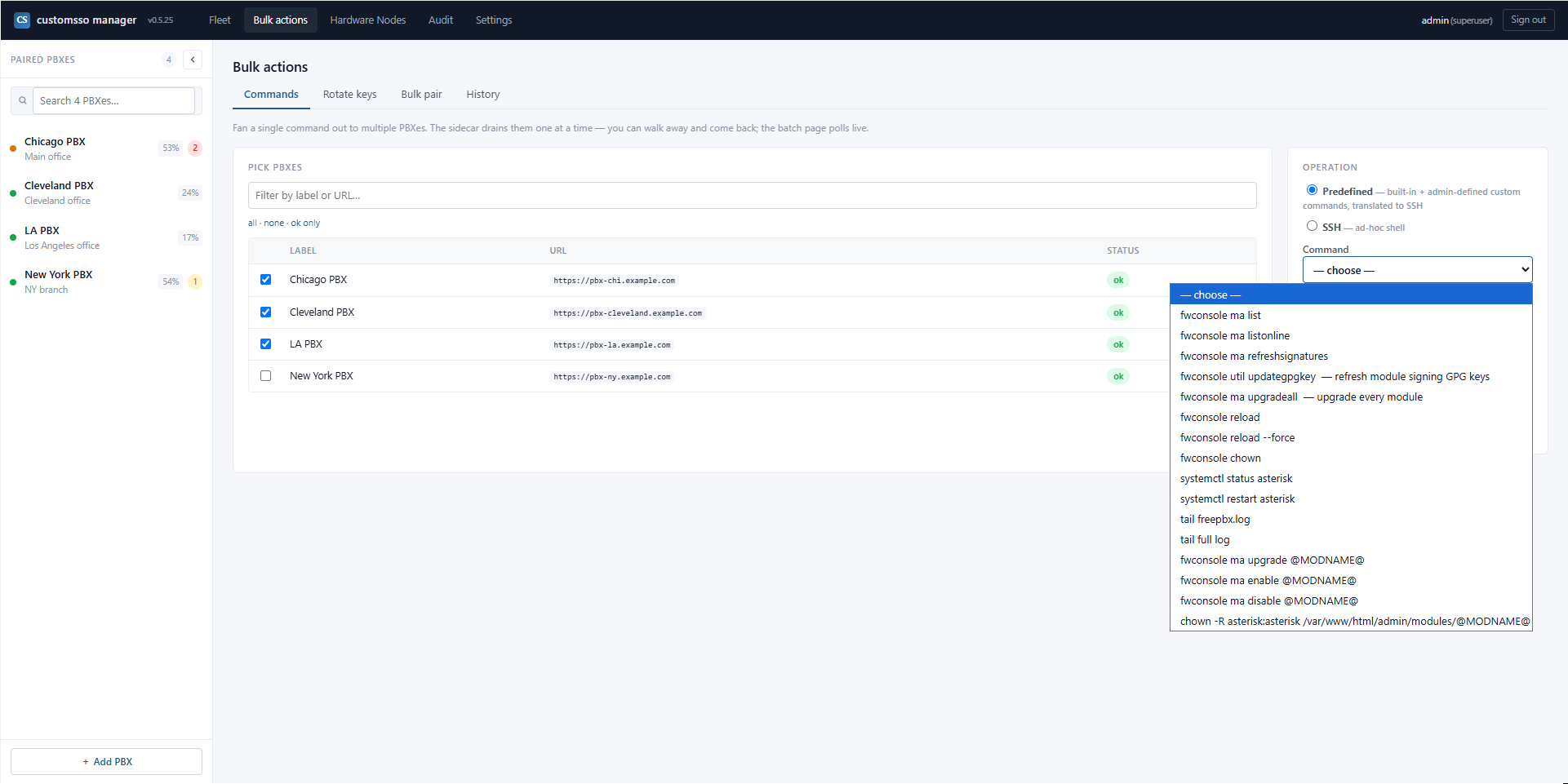
Run fwconsole reload, module upgrades, fwconsole chown, GPG key refresh, or an admin-defined custom command against every selected PBX in one form. Every job SSH-audited end-to-end with output captured per box.
Create scheduled jobs from the manager UI with standard 5-field Linux cron. A bulk job runs on every paired PBX and auto-extends to newly-paired ones; a per-PBX job targets a single box for one-off automations. Pause a bulk job on one PBX without touching the rest. Every run captures exit code, stdout, stderr, and duration into the searchable audit log — no crontab entries land on the PBXes, so unpairing a box cleanly stops its scheduled work.
Every PBX's FreePBX notifications (module updates available, tampered files, cert expiries, low-disk warnings, sysadmin alerts, everything the FreePBX dashboard would surface) rolled up in the manager. Per-PBX counts + severity dots in the sidebar, full notification list on each PBX's Status page. No more logging into each box to check for pending updates or FW_TAMPERED warnings — see the whole fleet's state at a glance.
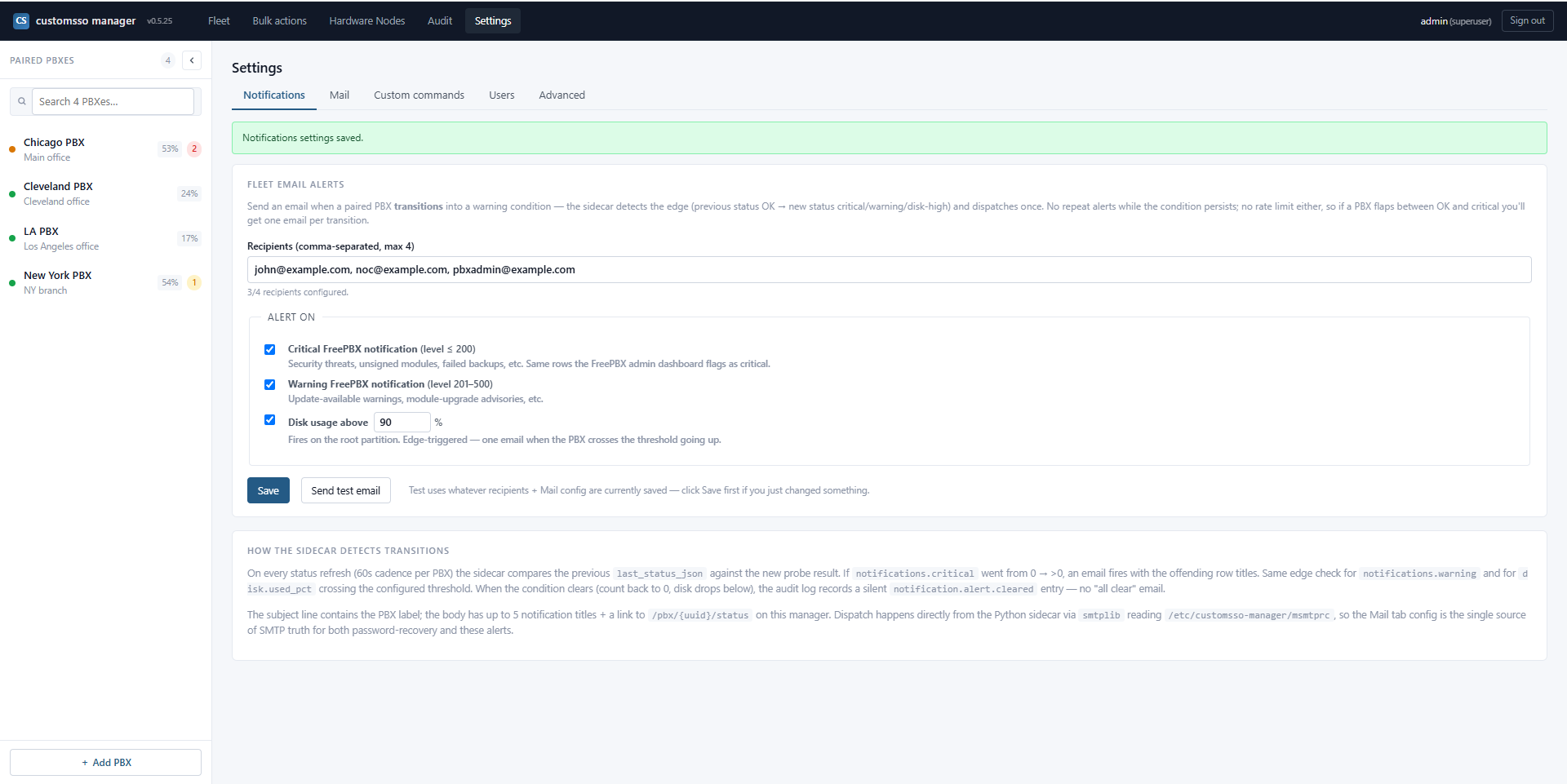
Sidecar watches each PBX's FreePBX notification counts + disk usage on a 60-second cadence. Emails fire when a PBX transitions into a critical/warning state or crosses your disk threshold. Up to 4 recipients.
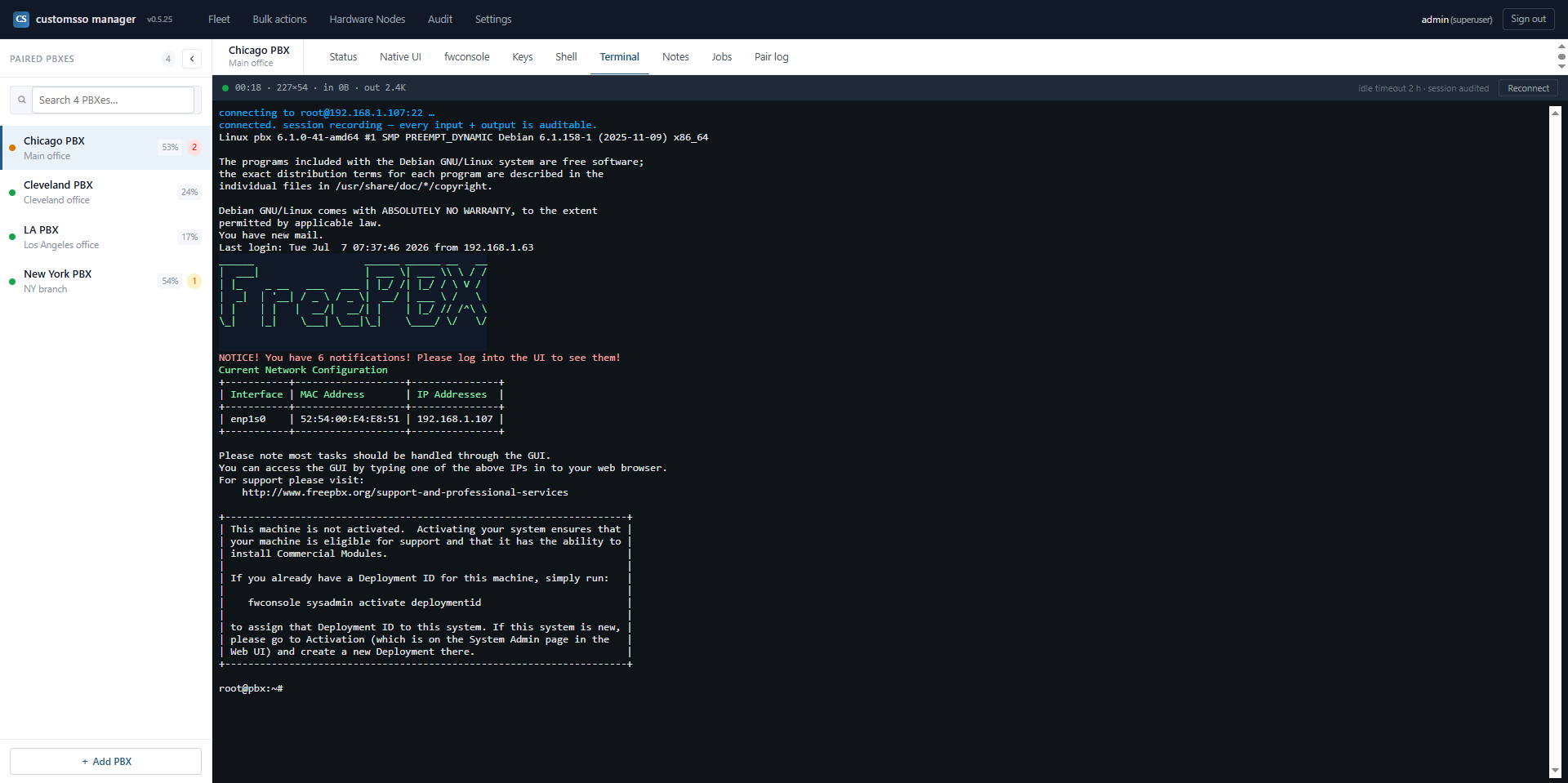
Click a PBX, get a browser xterm.js session with the same audited SSH channel the sidecar uses. Configurable idle timeout.
Admins define reusable shell templates (with @MODNAME@ / @LINES@ placeholders) that appear in every PBX's fwconsole dropdown + the Bulk actions form. No code changes required to add a new operation.
Every SSH private key and HMAC secret protected by AES-256-GCM under a rotatable master key. Master-key rotation re-encrypts the whole fleet in one transaction.
Every action attributable to a real user with IP + timestamp. Login attempts, pair/unpair, fwconsole runs, config edits, notification alerts, SSO token issuance, UCP impersonation, backup and restore events.
Superuser, admin, operator, readonly. Fine-grained: an operator can dispatch commands but can't edit user accounts, mint SSO tokens for admin or UCP, or touch master-key material. Multi-recipient password recovery via msmtp; superuser can hard-reset any account.
New in v1.0.3. Fleet-wide scheduled command dispatch, driven entirely from the manager — no crontab entries on any PBX.
The bulk-actions form is built for running something now. v1.0.3 adds the other half: running it on a schedule. Create a cron job once in the manager UI and it dispatches over the same audited SSH channel the rest of the manager uses — a Sunday-night fwconsole reload window, a nightly GPG-key refresh, a weekly module-update sweep, whatever your fleet needs on a timer.
A bulk job runs on every paired PBX and auto-extends to newly-added ones — pair a new box tomorrow and last week's fleet cron already covers it, with nothing to re-edit. Need a one-off automation on a single box instead? Create a per-PBX job that targets just that PBX. And you can pause any bulk job on a specific PBX without touching its run on the rest of the fleet.
Schedule with the standard 5-field Linux cron expression you already know (0 2 * * 0 for 2 am every Sunday). Each job executes any command up to 512 characters over SSH. Every run captures exit code, stdout, stderr, and duration into a searchable audit log — so you can see exactly what ran, where, when, and how it exited.
The schedule lives in the manager, not in each PBX's crontab. Nothing is written to the PBXes' cron.d or user crontabs — the manager owns the timer and dispatches over SSH at run time. Unpair a PBX and its scheduled work stops cleanly, with no orphaned cron entry left behind on the box.
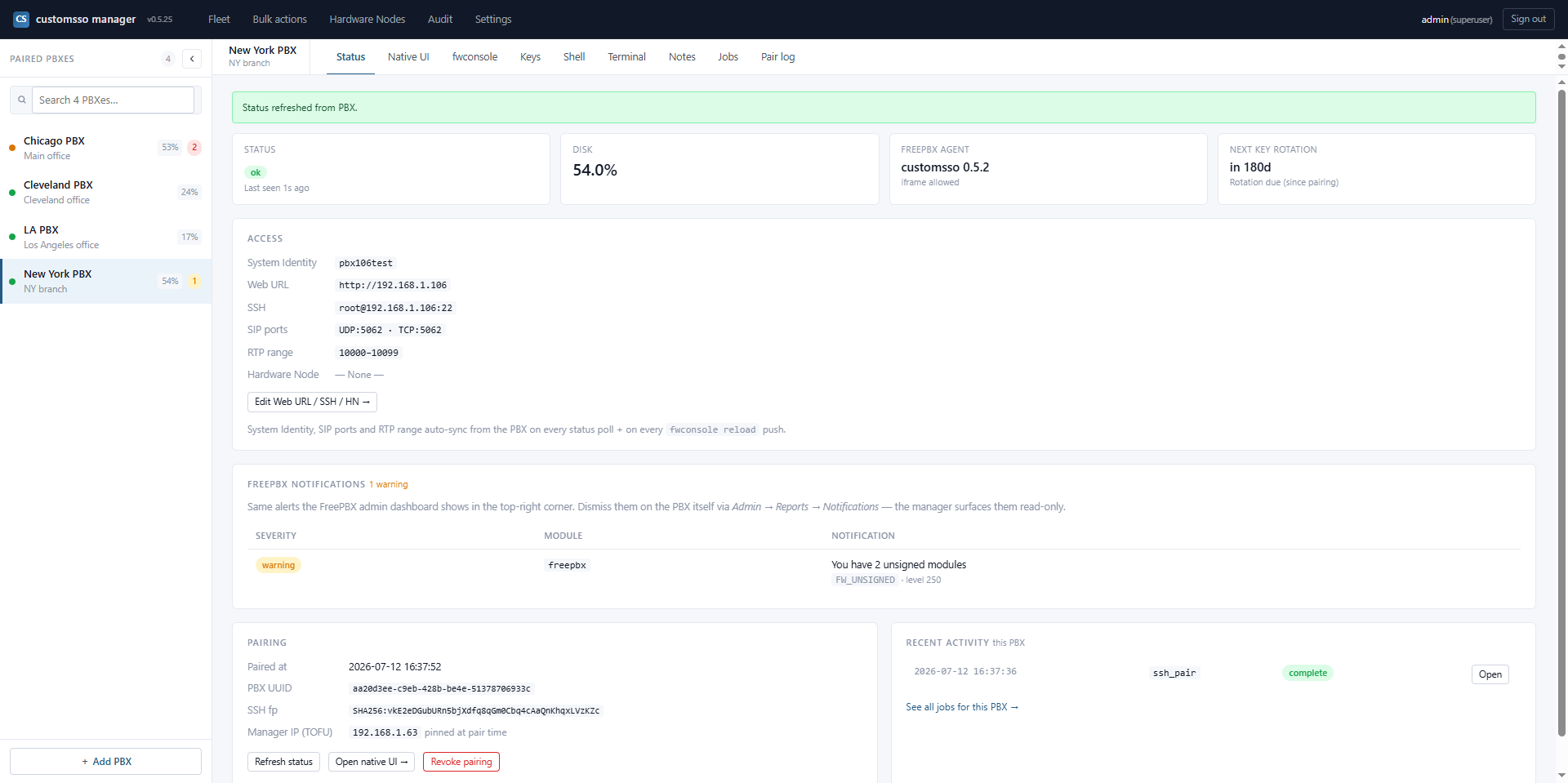
Once a PBX is paired, opening it from the manager fleet view is a single click — no password, no second login, no bouncing through a FreePBX login page. The manager mints a short-lived HMAC-signed SSO token (30-second TTL, one-time-use nonce, replay-proof), redirects your browser to the paired PBX's /customsso-sso landing endpoint, and drops you straight into the native FreePBX admin UI, already authenticated as admin.
The whole FreePBX interface renders inside an iframe tab within the manager — every menu, every module, every page the FreePBX web admin exposes, wrapped in the manager's chrome — so you keep the sidebar of paired PBXes visible on the left while operating any single box on the right. Prefer a full-window handoff? The same URL works as a redirect out to the PBX's own origin.
Because the SSO channel is out-of-band from any HTTP header the browser exposes, the passwordless experience never widens the auth surface: no bearer to leak, no cookie to hijack across origins.
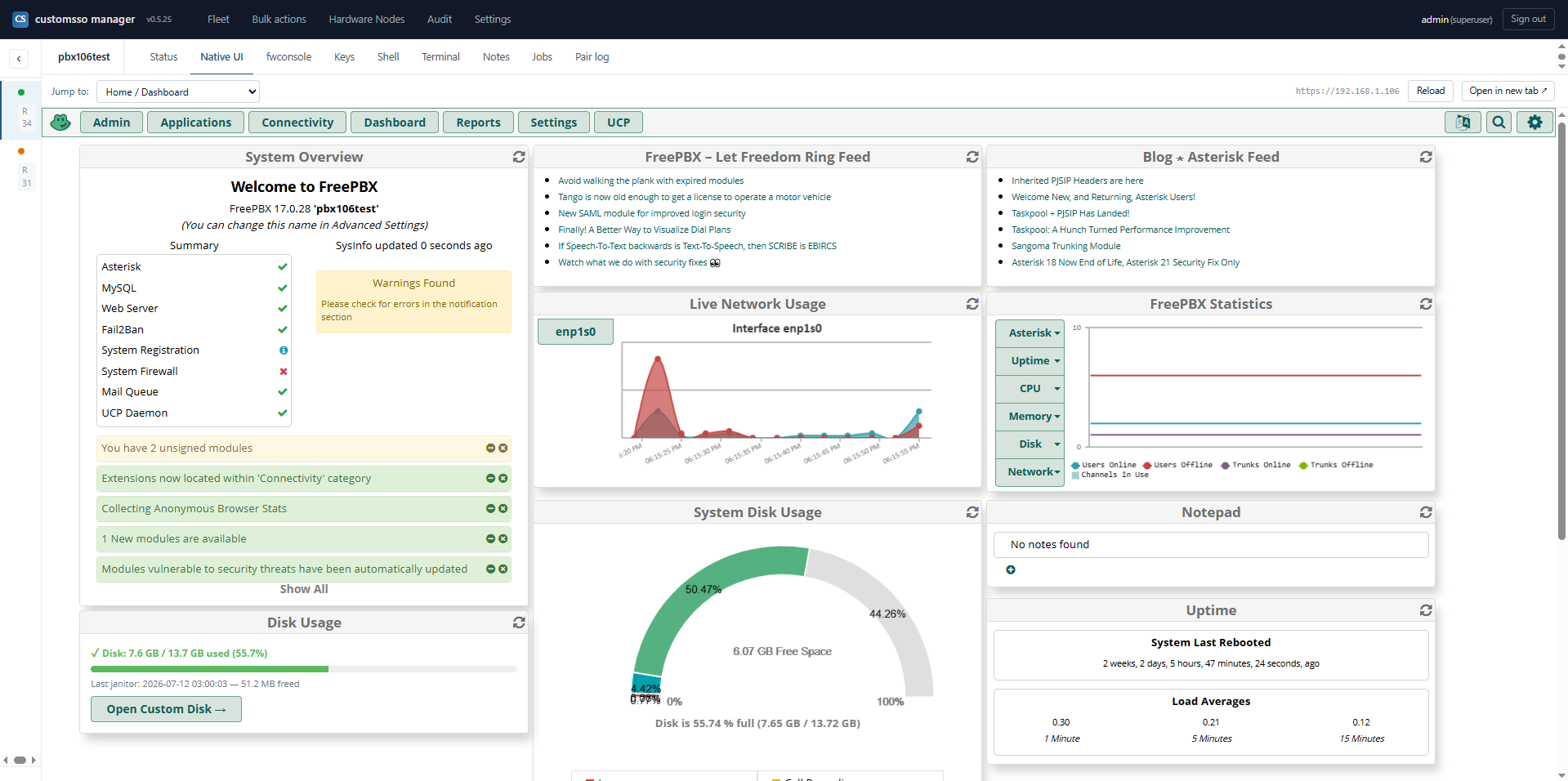
New in v1.0.2. Reproduce a user-reported UCP issue as that user in seconds — no password reset, no phone call, no user disruption.
When a user calls to say "my voicemail isn't playing" or "my BLF is stuck," the fastest path to a fix is seeing what they see. customsso-manager gives fleet admins a searchable per-PBX picker of every UCP-enabled user on any paired FreePBX box, with click-to-impersonate — no password required, no reset flow, no phoning the user.
Under the hood: each paired FreePBX box pushes its User Manager roster to the manager on every reload (with a 60-second sidecar poll as backstop). The picker filters to users whose Allow UCP Login? is effectively true — respecting per-user overrides plus group defaults. Click Open UCP → on any row and the manager mints a signed SSO token with a variant=ucp claim, redirects the iframe to the PBX's /customsso-sso endpoint, and lands you in the user's UCP dashboard — voicemail, contacts, call history, call recordings, presence, extension settings, whatever UCP exposes for that user — all rendered in an iframe tab in the manager, one click away from switching to another user.
Every impersonation is admin-role gated on the manager, CSRF-protected, HMAC-signed with the per-PBX secret, one-shot-nonce enforced, and IP-pinned to the operator's browser. Every attempt (success or reject) is written to the audit log with reason, target user, and operator identity. Enumeration attempts against invalid usernames are audit-logged too.
Compare to the alternative — hard-resetting the user's UCP password, disrupting them, and hoping they haven't cached the old one somewhere — and the productivity win for FreePBX helpdesk and MSP tier-1 support is immediate. Impersonation leaves no side-effect on the user's account.
Available in v0.6.3+. Tested end-to-end on production fleets. Full fleet recovery from bare metal in minutes, not days.
Every self-hosted operator has the same 3-am worry: what happens if the manager host dies? customsso-manager's answer is a first-class, tested-in-production disaster-recovery workflow, not an afterthought.
One admin action, protected by a passphrase you set, produces a single .tar.gz.enc bundle containing: the manager MariaDB dump, the master AES-256-GCM key, every paired PBX's encrypted SSH private key + HMAC secret, the msmtp SMTP config, the Apache TLS chain, and the fleet manifest. The whole bundle is AES-256-GCM-encrypted with a key derived from your passphrase via PBKDF2. Store it wherever you store your other backups — S3, Backblaze, offsite disk, your existing enterprise backup system. The ciphertext is safe against passive theft.
Provision a fresh Linux host, run the same one-line installer, log in, and drop the encrypted backup into the Restore form. The manager decrypts, replays the database dump, re-imports the master key, and — this is the payoff — offers a Reclaim wizard that iterates every previously-paired PBX and passwordlessly re-establishes ownership. For each PBX, the manager SSHes in using the private key from the restored bundle, rotates a fresh keypair + HMAC secret, updates the on-PBX manifest, and (optionally) locks the old manager out by removing its authorized_keys entry.
Manual DR runbooks that say "on each of 50 PBXes, SSH in as root and rotate the keys, then update the manager DB by hand." Total downtime dropped from days (or weeks, in practice) to minutes. Tested end-to-end on production fleets since v0.6.3.
Same single-line install on a fresh minimal box, regardless of OS family — the installer detects Oracle Linux vs Debian at boot and takes the right branch.
The bootstrap fetches latest.tar.gz, verifies its SHA256 against the same-origin SHA256SUMS file, and execs the installer. When it finishes you get a first-run URL to claim the superuser account.
One install.sh, two OS families. The installer detects /etc/os-release and takes the right branch — Apache (httpd vs apache2), package manager (dnf vs apt), user (apache vs www-data), and firewall (firewalld vs ufw) all parameterized.
Minimal install, tested on 9.8. Primary target for the project; the OL9 branch of the installer has the most testing.
Supported; the installer detects and configures it via the same dnf paths as OL9.
First-class supported since v0.6.0. Tested on stable stock cloud images. Full apt + apache2 + www-data + no-SELinux path.
Supported via the same Debian branch as bookworm.
Jammy and Noble share the Debian install path (same apt + apache2 + www-data + no-SELinux paths). Less formally tested than Debian, but the branch is the same code.
Should work via the OL9 dnf paths (untested; report issues via the vulnerability contact).
| Resource | Minimum | Recommended |
|---|---|---|
| CPU | 1 vCPU | 2 vCPU |
| RAM | 1 GB | 2 GB |
| Disk | 10 GB | 20 GB (audit + job output grows over time; 90-day retention default) |
| Network | Reach every paired PBX on TCP 22 (SSH) and TCP 443 (SSO landing) | |
For fleets larger than ~50 PBXes, add 500 MB RAM and 5 GB disk per additional 50 PBXes as a rough scaling rule. The sidecar is I/O-bound, not CPU-bound; the bottleneck at scale is the concurrent-SSH pool (default 30 global / 5 per hardware node), not the box.
Same components on both OS families — only the package names differ. No manual prep required beyond a minimal OS image; the installer pulls everything via dnf (OL9/10) or apt (Debian/Ubuntu) during step [4/16]. Functional equivalents side by side.
| Purpose | OL9 / OL10 | Debian 12/13 · Ubuntu 22/24 |
|---|---|---|
| TLS-terminating web server | httpd, mod_ssl |
apache2 |
| PHP 8 runtime + extensions | php, php-fpm, php-mysqlnd, php-mbstring, php-json, php-curl, php-pdo, php-process |
php, libapache2-mod-php, php-mysql, php-mbstring, php-curl, php-xml |
| Application database | mariadb-server, mariadb |
mariadb-server, mariadb-client |
| Sidecar runtime | python3, python3-pip |
python3, python3-venv, python3-paramiko |
| Let's Encrypt (optional) | certbot, python3-certbot-apache |
certbot, python3-certbot-apache |
| Brute-force protection + firewall | fail2ban, firewalld |
fail2ban, ufw |
| SMTP relay for recovery + alerts | msmtp |
msmtp |
| Misc runtime tooling | git, openssl, uuid, tar, policycoreutils-python-utils |
git, openssl, uuid-runtime, tar |
SELinux on OL9/10 — the installer sets the required booleans + labels (httpd_can_network_connect, httpd_sys_rw_content_t on /etc/customsso-manager, etc.) during step [7/16]. AppArmor on Debian/Ubuntu — no per-file profile tweaks needed; the stock apache2 profile is compatible.
Two layers: aggregated in-app notification rollup (v0.5.25+) plus edge-triggered email delivery for the events that need real-time attention.
Every paired PBX's FreePBX notifications (pending module updates, tampered-file warnings, certificate expiries, low-disk alerts, sysadmin alerts) aggregated in the sidebar with per-PBX severity dots and counts. The PBX Status page shows the full notification list with severity + module + message. A Refresh module list button per PBX (v0.6.7+) forces FreePBX to re-check its module catalog for pending updates.
The sidecar watches every paired PBX on a 60-second cadence. Edge-triggered emails when a PBX transitions into a critical/warning state or crosses your disk threshold. Up to 4 recipient addresses per alert type. Delivered via the same msmtp configuration that handles password recovery — compatible with Gmail, Office 365, Amazon SES, Postfix relay, or any msmtp-compatible SMTP server.
Every SSH private key and HMAC secret is protected by AES-256-GCM under a rotatable master key. Master-key rotation re-encrypts the whole fleet in one transaction — if a key is ever suspected compromised, one command rolls the entire secret store.
Both admin-UI SSO and UCP impersonation share the same HMAC-SHA256 handoff: per-PBX signing secret, 30-second TTL, one-shot nonce (UNIQUE-constrained on the PBX side, so replays fail), IP-pinned to the manager's source. A variant claim inside the signed payload distinguishes admin from UCP.
Every action attributable to a real user with IP + timestamp. Login attempts, pair/unpair, fwconsole runs, config edits, notification alerts, SSO token issuance, UCP impersonation attempts (success + reject + enumeration probes), backup and restore events. Retention configurable per organization (90 days default).
Four roles: superuser, admin, operator, readonly. Fine-grained — an operator can dispatch commands but can't edit user accounts, mint SSO tokens for admin or UCP, or touch master-key material.
Pairing writes a manifest (/etc/customsso/pbx.manifest.json) listing every file and config change made on the PBX. Unpair iterates the manifest and undoes exactly those things — no orphan config, no leftover users, no stray SSH keys.
Backup bundles are AES-256-GCM encrypted with a PBKDF2-derived key from a passphrase you set. Manager enforces a 20-character minimum. A leaked bundle is safe against passive theft; if you suspect the passphrase itself was compromised, master-key rotation on the running manager invalidates all prior bundles in one transaction.
Yes. MIT licensed, open source, no seat licensing. Self-hosted on your own infrastructure.
No — the manager targets FreePBX 16 and 17. If you're on FreePBX 15, upgrade to 16 or 17 first.
No. The manager reaches the PBXes; the PBXes don't need to reach the manager (except to complete the initial pair handshake). Both sides can live in a private network as long as the manager can SSH into each PBX.
An operator signs into the manager once; from the fleet view, one click lands them inside any paired PBX's FreePBX admin UI, already authenticated as admin on that PBX. No re-entering credentials per box. The PBX sees a signed SSO token issued by the manager over an out-of-band channel; the operator sees the native FreePBX UI (in an iframe tab or a full-window redirect, their choice).
Embedded. The manager renders the full FreePBX admin UI inside an iframe as a tab in its own interface — the fleet sidebar stays visible on the left, the FreePBX pages on the right. You can also switch to full-window redirect mode per PBX if you prefer working on the PBX's own origin. Both modes use the same passwordless SSO handoff underneath.
Yes — that's the UCP impersonation feature (v1.0.0+). Fleet admins get a searchable per-PBX picker of every UCP-enabled user and click Open UCP → on any row to land in that user's UCP session, no password required, no reset flow. Designed for helpdesk troubleshooting: reproduce a user-reported UCP issue (voicemail playback, BLF, contacts, call history) as the affected user in seconds. Admin role required on the manager, HMAC-signed and IP-pinned per session, every impersonation audit-logged.
Only users whose Allow UCP Login? is effectively true — respecting per-user overrides plus group defaults. Toggle Admin → User Management → user → UCP → Allow UCP Login? to No and that user drops from the picker on the next reload push (or 60-second sidecar poll). Users without a default extension or with the sentinel none extension are always excluded. Every fresh FreePBX 17 install ships with the "All Users" group default set to allow login, so out of the box the picker shows every User Manager user with an extension.
Each SSO handoff mints a token signed with a per-PBX HMAC-SHA256 secret that only the manager and that PBX share. The token has a 30-second TTL, a one-time-use nonce (tracked in a UNIQUE-constrained table on the PBX so replays fail), and validates only when the request arrives from the manager's pinned source IP. There is no long-lived bearer token, no shared cookie across origins, and no plaintext credential ever touches the browser or the wire. The same signing pipeline is used for both admin-UI SSO and UCP impersonation, with a variant claim inside the signed payload distinguishing the two.
Yes — the Backup + Reclaim workflow (v0.6.3+) is designed exactly for that. The Backup form produces an AES-256-GCM-encrypted bundle (passphrase-protected via PBKDF2) containing the manager database, master key, every PBX's SSH keys + HMAC secrets, the SMTP config, and the TLS chain. Restore the bundle on a fresh host and run the Reclaim wizard — the manager passwordlessly SSHes into every previously-paired PBX, rotates fresh keys, and (optionally) locks the old manager out. Full fleet DR from bare metal in minutes, not days. Tested in production since v0.6.3.
The bundle is AES-256-GCM-encrypted with a PBKDF2-derived key from the passphrase you set at backup time. A leaked bundle is safe against passive theft as long as your passphrase resists offline cracking (use 20+ characters — the manager enforces this minimum). If you suspect the passphrase itself was compromised, rotate the master key on the running manager (Settings → Master key rotation) — the fleet re-encrypts in one transaction and any old bundle becomes useless.
Both. Debian 12 (bookworm) is first-class supported since v0.6.0, with Debian 13 (trixie) on the same branch. Ubuntu 22.04 (jammy) and 24.04 (noble) share the Debian install path (same apt + apache2 + www-data + no-SELinux paths) — less formally tested than Debian, but the branch is the same code. One install.sh detects the OS family via /etc/os-release and takes the right branch — no separate installer per distro. Full step-by-step guides for both are in the docs (FRESH_INSTALL_DEBIAN.md, FRESH_INSTALL_OL9.md).
Yes — every paired PBX's FreePBX notifications (pending module updates, tampered-file warnings, certificate expiries, low-disk alerts, sysadmin alerts, everything the FreePBX dashboard's notification widget would show) are aggregated in the manager since v0.5.25. The sidebar carries per-PBX severity dots and counts; the PBX Status page shows the full notification list with severity + module + message. Refresh cadence is 60 seconds, with a Refresh module list button per PBX (v0.6.7+) that forces FreePBX to re-check its module catalog for pending updates. No more logging into each of 20+ PBXes to check which ones have pending security updates or FW_TAMPERED warnings.
Yes — scheduled fleet cron (v1.0.3+). Create a job in the manager UI with a standard 5-field cron expression (0 2 * * 0). A bulk job runs on every paired PBX and auto-extends to newly-paired boxes; a per-PBX job targets a single box for one-off automations. Each run executes any command up to 512 characters over the audited SSH channel and records exit code, stdout, stderr, and duration in a searchable log. You can pause a bulk job on one PBX without affecting the others. Nothing is written to the PBXes' crontabs — the manager owns the schedule, so unpairing a PBX stops its scheduled work cleanly.
Both are commercial products with per-endpoint or per-seat pricing. customsso-manager is self-hosted, open source, and has no seat model. Feature-parity is nowhere near the Sangoma portal, but the core SSO + fleet-operations + DR backup + UCP impersonation story is there for teams that don't need the full commercial offering.
No — pairing writes a manifest (/etc/customsso/pbx.manifest.json) listing every file and config change. Unpair iterates the manifest and undoes exactly those things. No orphan config, no leftover users, no stray SSH keys.
Paired PBXes keep working normally — the SSO landing endpoint on each PBX is served by that PBX itself, so users authenticated via active sessions keep their access. New logins via the manager UI fail until the manager is back. No PBX-side runtime dependency on the manager for call handling or SIP.
Yes — the installer creates a placeholder /etc/customsso-manager/msmtprc you edit through the UI (Settings → Mail). Standard msmtp format: Gmail, Office 365, SES, Postfix relay, whatever. One SMTP config drives both password-recovery and notification alerts.
Every 60 seconds per PBX. The sidecar SSH-probes each PBX in a small worker pool (default 30 concurrent globally, 5 per hardware node). Status includes: reachability, disk usage, FreePBX notification counts, SIP/RTP port config, framing settings, and (for UCP-picker freshness) the User Manager roster.
Current version: Manager v1.0.3 paired with FreePBX SSO Module v1.0.2. Follow the fresh-install guide for OS prep, one-liner bootstrap, and first-run URL claim — the guide is the download.
Full docs, config reference, and troubleshooting guide are hosted alongside the release repo.
Vulnerability disclosure: (GPG key 046E8CA0EE6A755B).
Passwordless admin SSO, UCP impersonation for helpdesk, encrypted DR backup, fleet-wide notification rollup — free, open source, self-hosted. One binary. No seats. No agents to distribute. Install on a fresh Oracle Linux, Debian, or Ubuntu box in one line.